Touch Screen Calibration
Screen calibration can be accessed from System Utilities > Touch Screen Calibration.
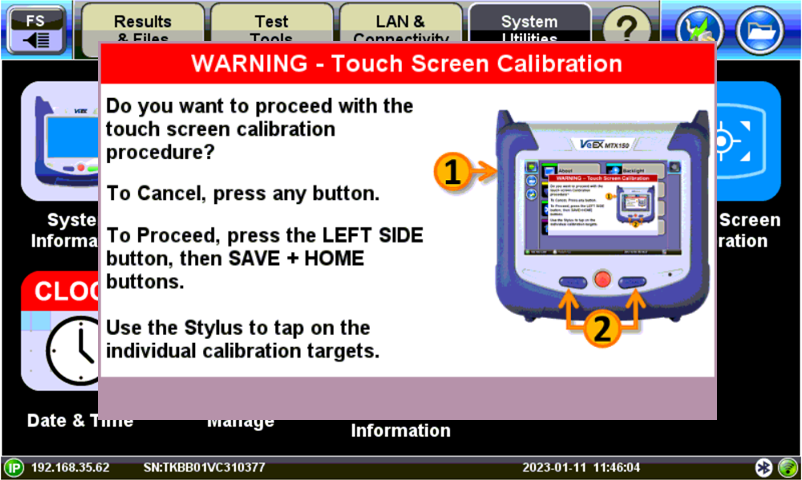
Press the  Save and
  Home buttons simultaneously, until you hear a tone (beep), quickly press the LeftSideButton+ + combination to confirm. Then the touch screen calibration procedure starts.
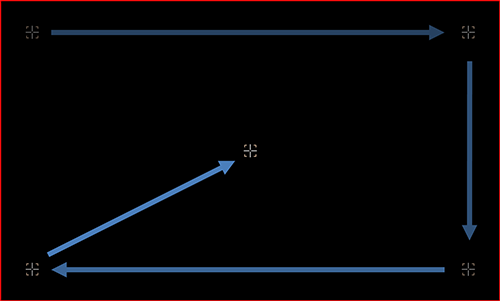
 Once the touch screen calibration sequence has been started, it must be completed. Accurately touch the calibration points with the tip of the stylus. Once the touch screen calibration sequence has been started, it must be completed. Accurately touch the calibration points with the tip of the stylus.
|
 If the above procedures do not fix the touch screen issues, go to the VeEX website's Contact Us page, select [√] Customer Service/Tech Support, then provide the Product Type, Serial Number and a brief description of the behavior being experienced. If it is related to colder ambient temperatures, please state the approximate temperatures. If the above procedures do not fix the touch screen issues, go to the VeEX website's Contact Us page, select [√] Customer Service/Tech Support, then provide the Product Type, Serial Number and a brief description of the behavior being experienced. If it is related to colder ambient temperatures, please state the approximate temperatures.
|