Fiber Tools Overview
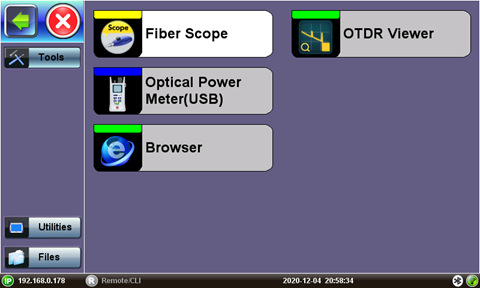
Fiber Tools Home Menu (FX150 reference)
 Available Tool applications depend on the product model.
Fiber Scope
The VeEX digital fiber inspection scopes evaluate fiber optic connectors for dirt and end face quality. The handheld probe design enables easy inspection of patch cords and connector panels. Extended tips are available for hard to reach bulkhead or patch panel connectors. Clear images are displayed on the test sets for immediate analysis and can be saved for record keeping.
The Fiberscope test application can be used in conjunction with any VeEX Digital Fiber Inspection Microscope.
All DI series fiberscopes can auto freeze image when focus is achieved to capture the image and qualify the connector endface for cleanliness and damage per IEC 61300-3-35. For more information about available connector tips, see the DI-1000/DI-1000MPO/DI-3000 Digital Fiber Inspection Microscope Adapter Tips Guide.
All wired fiber inspection scopes are powered via a USB Type-A connection with a host device or the VeEX Power Bank/WiFi Bridge. For host devices that have Micro-B or Micro-C input ports, USB Type A to Micro-B or Micro-C OTG dongle adapters are available as an add-on order from VeEX.
More about Fiber Scope functions
OTDR Viewer
This built-in application allows the test platform to view previously saved .sor trace results and edit events, as needed. IF an OPX-BOXe is connected to the platform via direct USB connection, WiFi or Bluetooth®., this built-in application can also be used to control all OTDR test functions.
More about OTDR Viewer functions
OPM
The VeEX Inc Optical Power meters are made with fast and accurate testing in mind. They are used to measure the power running through a cable at a given wavelength, and interface with phone, PC, or other VeEX devices to save and generate reports on the findings. This information is used to verify that the cable span is working correctly and to find the source of the problem when it's not. When paired with a VeEX Optical Light Source (OLS) or as part of a VeEX Optical Loss Test Set (OLTS), which includes both, WaveID can be used to quickly test several wavelengths without having to adjust the OPM settings.
Browser
The built-in web browser uses the management port IP connection. An active IP connection can be established either through Ethernet or WiFi. The web browser defaults to VeEX's test website. Use the Web browser's navigation bar to enter the name of the website you wish to reach. Navigation capabilities may be limited.