Frame Settings
Frames tab: User configures the following:
- Preset Frames: User selects from a list of recommended test frame sizes defined in RFC 2544:
- Test frames are 64, 128, 256, 512, 1024, 1280, and 1518 bytes.
- The default selected frames are 64 and 1518 bytes.
- To select/deselect any of the recommended test frames, check the box to the right of the desired frame.
When VLAN tagging or MPLS tagging is enabled, the value in parentheses reflects the actual frame size transmitted. For example one VLAN tag adds 4 bytes to the frame size, therefore a 64B frame becomes a 68 byte frame.
- Add frame: The user can add two additional user configurable test frames of any size ranging from 64 bytes to 10000 bytes.
- To add additional test frames, tap the Add Frame button.
- Enter the frame size using the numeric keypad and click apply.
- Press the back button to return to the frames screen.
- The new custom frame size is displayed (it can be enabled or disabled as needed).
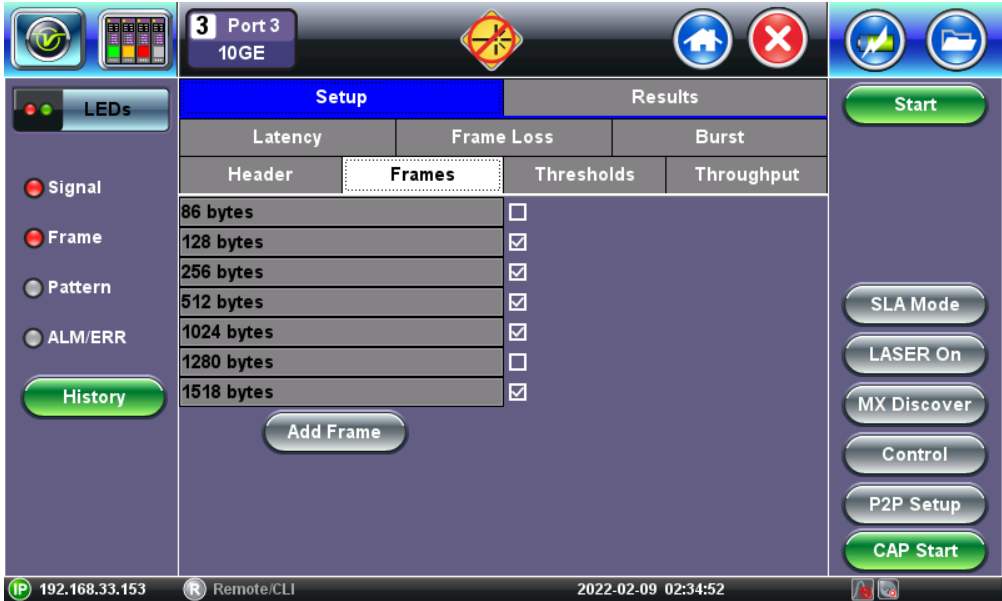
RFC 2544 Setup - Frame Settings