Test Point Compensation (TPC) for Attenuation Adjustment
Optical signals are strongest near the OLT. Using an in-line attenuator with TPC helps protect the receiver from high input power while maintaining accurate power readings.
Test Point Compensation (TPC) automatically adjusts for the attenuator by subtracting its impact from the measured power levels. This ensures that displayed measurements reflect the actual signal strength, even when attenuation is applied.
Enable TPC in the settings to ensure precise measurements when testing with an attenuator in the signal path.
To enable TPC:
-
On the OPM Summary screen, press Setup.
-
Toggle on Test Point Compensation and set the level of the attenuator you have in place.
-
Disconnect then reconnect to the ONU.
-
Look for the
 indicator that is displayed on the left of the screen. All values are now adjusting for the attenuation and subtracting the impact of it.
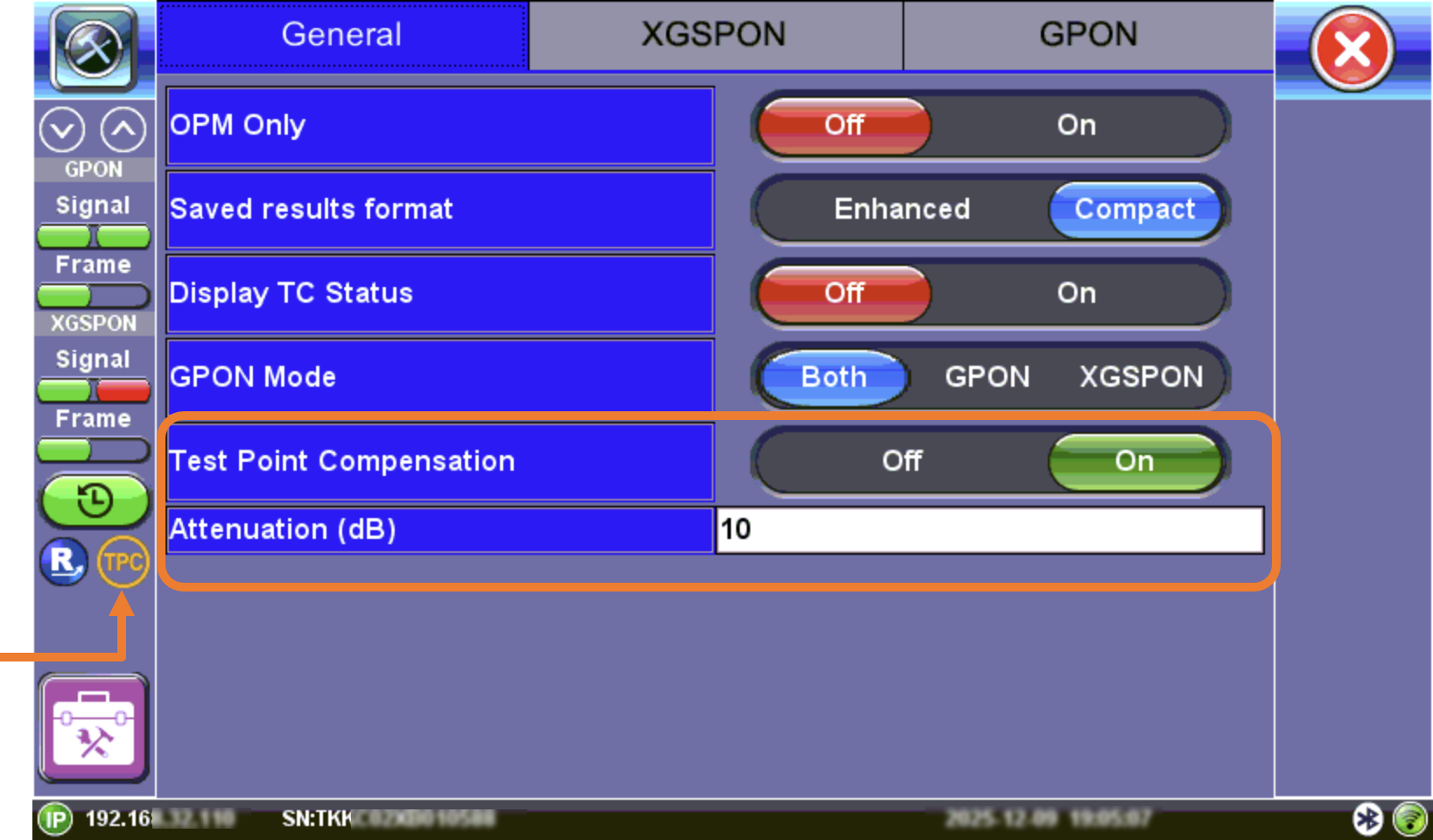
Test Point Compensation