FiberBEAST Screen Navigation
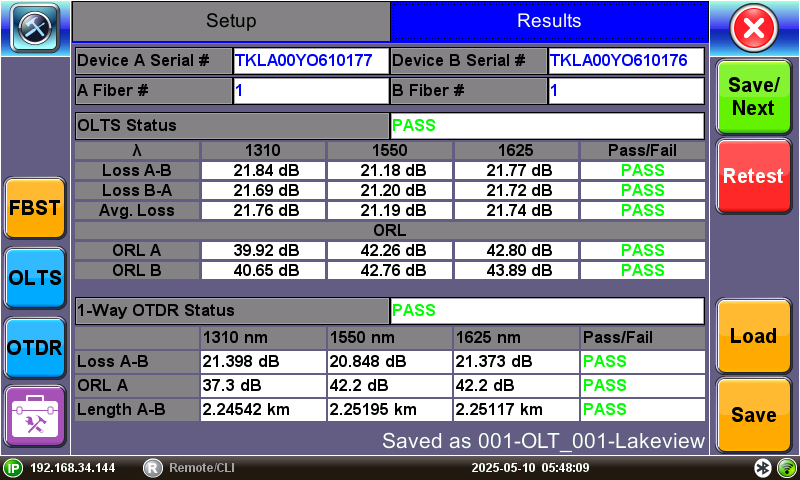
The bottom bar displays:
-
IP address, when connected
-
Remote control connection status
-
Date and time
-
Bluetooth and Wi-Fi network connection indicators
Icon Descriptions
|
|
Escape/Exit: Tap to close the Fiber test application and return to the Main Fiber Menu. |
|
|
FiberBEAST: Launches the FiberBEAST application. Select to adjust settings or start a new test. |
|
|
OLTS: Switches to the OLTS application view. Select to zero out the meter or perform a new reference. |
|
|
OTDR: Launches the OTDR application. View detailed OTDR results (LinkMap, event table, trace, etc.) and adjust OTDR settings. |
|
|
Start: Begin trace. |
|
|
Load: Shows software version and options to setup as server. |
|
|
P/F: Pass/Fail threshold settings. |

|
Save/Next: Stores the current results (if not already saved) and begins a new test. Any settings changed are applied to the new test. |

|
Retest: Retests the same fiber, optionally overwriting the current result. Any setting changes are appied to the new test. |
|
Start OTDR: Bypasses five second timer after OLTS tests and begins OTDR measurement immediately. |

|
Cancel: Stops the current test. |
|
Load: Load and view previously saved results. |

|
Save: Saves current test results. |
|
|
Autosave: Settings so results that are saved automatically contain default information in the filename. |
|
Acq. Next: On OLTS screen, saves individual fiber results and moves to the next fiber to manually begin ORL measurement. |
|
Redo Fiber: On OLTS screen, restarts ORL measurement of current fiber. |

|
Done: On OLTS screen, completes measurements and returns to FiberBEAST screen. |

|
Application Tools: Access applications, depending on the test set and options purchased i.e. Fiber Scope, OTDR, OPM/OLS/ORL, PFP Power Splitter, FiberBEAST™, etc. |
|
|
Fiber Scope – Shortcut key to access Fiber Scope, accessible from the Test Applications Toolbox menu. |

|
OLS/OPM/ORL: Launches the OLS/OPM/ORL applications, accessible from the Test Applications Toolbox menu. |
|
PFP Power Splitter: Launches the PFP Power Splitter application, accessible from the Test Applications Toolbox menu. |
|
OTDR: Launches the OTDR application, accessible from the Test Applications Toolbox menu. |

|
FiberBEAST: Launches the FiberBEAST application. |





For more information on screen icons, see Platform Screen Icons.