OPM Setup
The OPM Setup allows the configuration to measure power from G-PON/EPON's 1490 nm, XGS-PON/10G-EPON's 1577 nm or both wavelengths, as well as to enable or disable the Pass/Fail Thresholds evaluation.
General Setup
Display and measurement mode settings are configured in the General tab of the Setup screen. Select which mode to measure on the main screen, format of saved results, and enabling test point compensation. Compact results do not include ODN histograms. Refer to OPM Test Modes and Test Point Compensation (TPC) for Attenuation Adjustment.
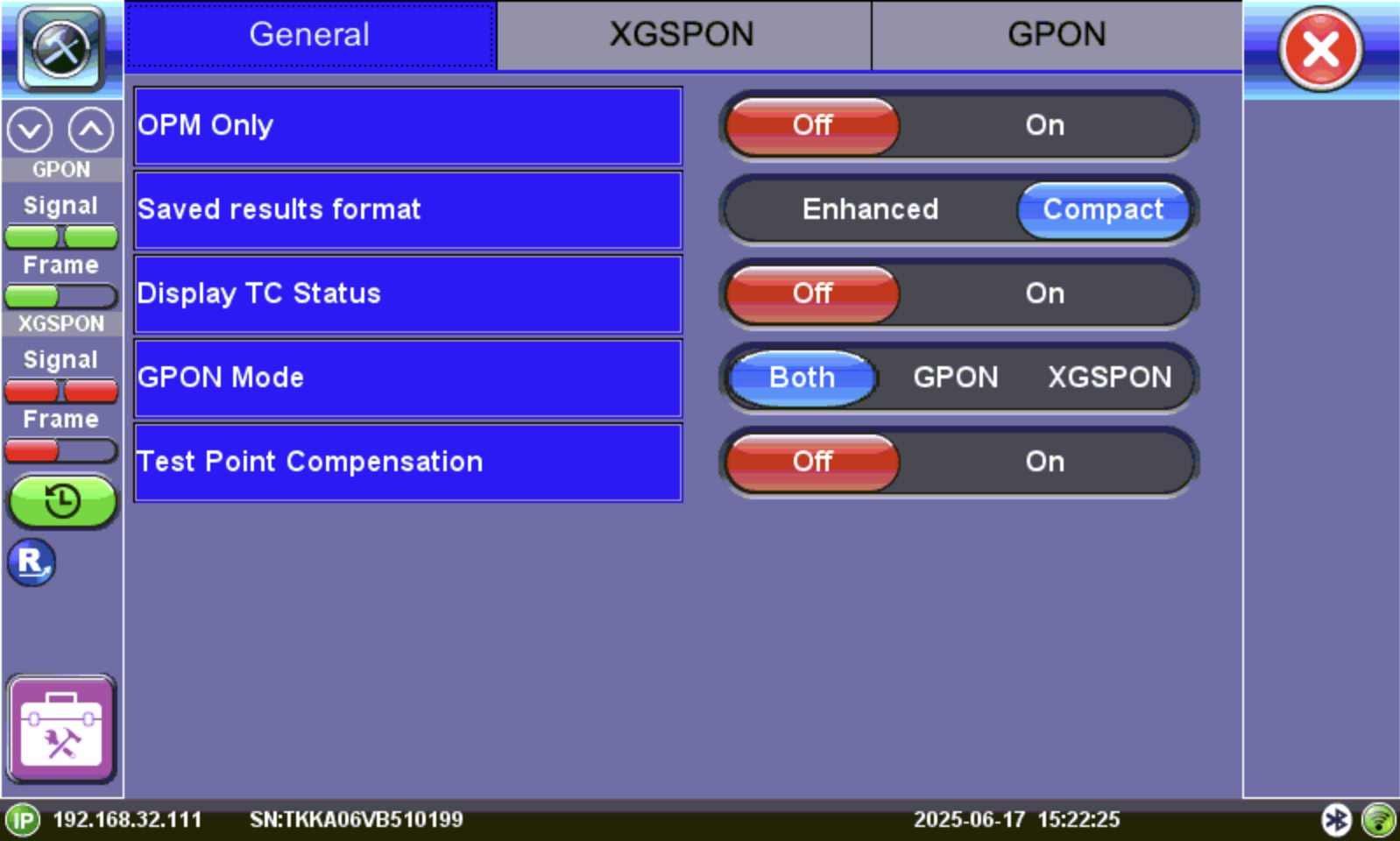
General Setup - GPON/XG(S)-PON
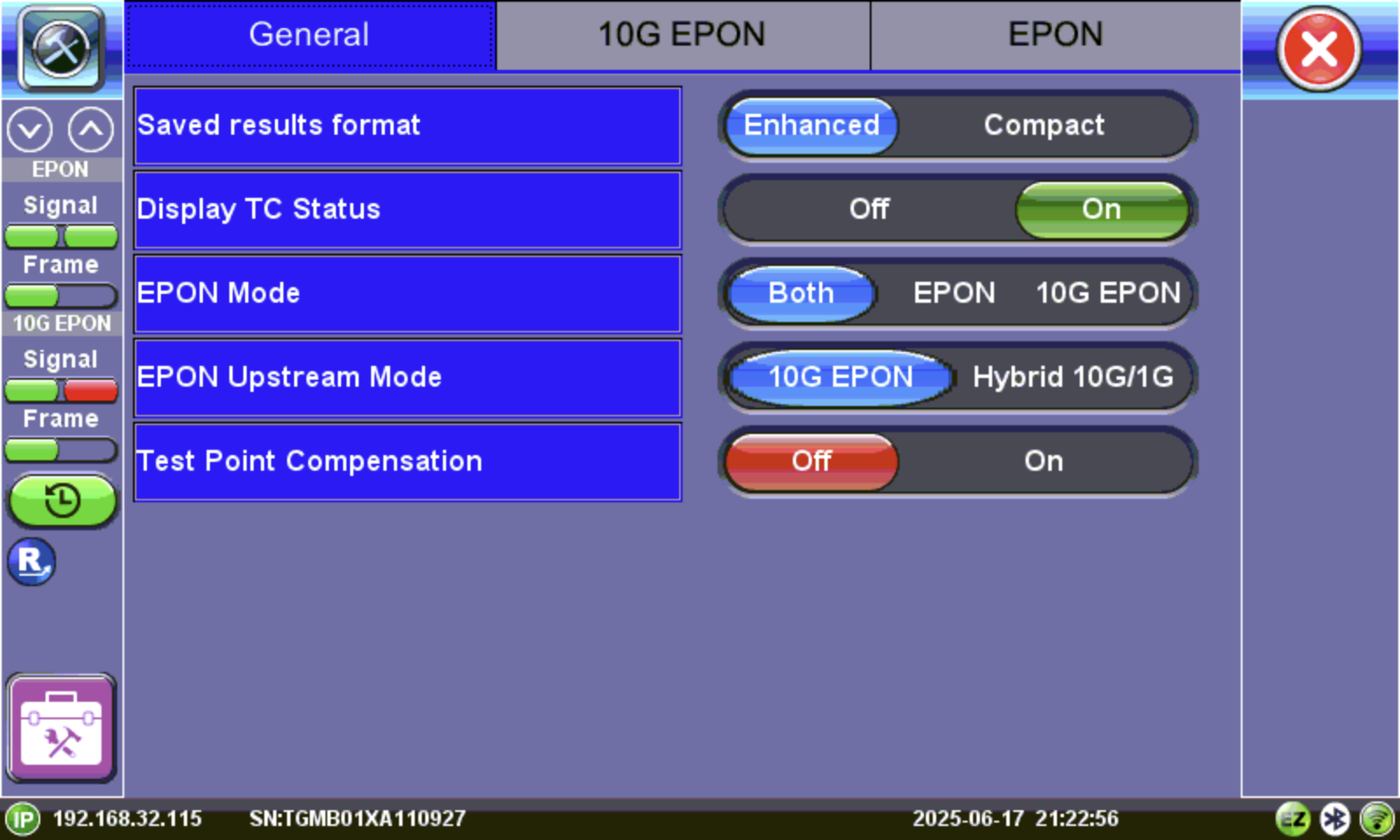
General Setup - EPON/10G EPON
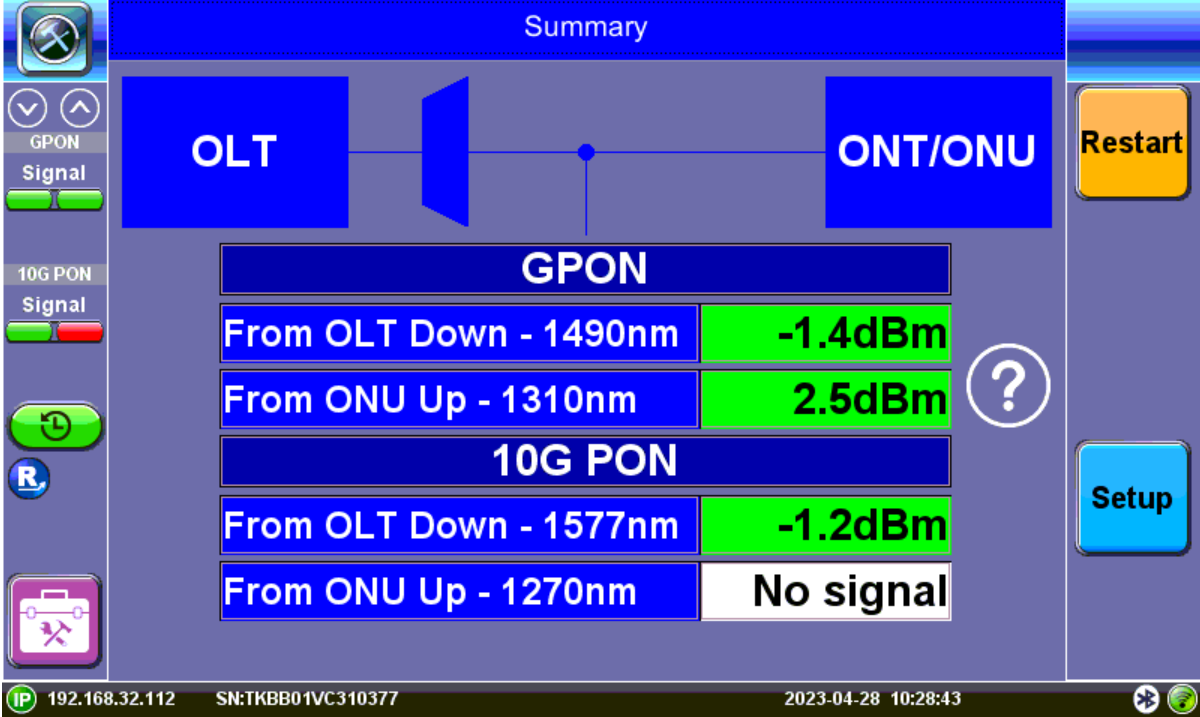
OPM Only View
GPON/XGS-PON Auto Setup vs. Manual Setup
Auto Setup (Live Network)
When connected to a live PON, the test set extracts the ODN class directly from the PON ID broadcast by the OLT.
-
PASS/FAIL thresholds are applied exactly as defined by the operator’s configuration.
-
Best used for commissioning and live verification, where the ODN class is already provisioned.
Manual Setup (Offline or Custom)
Technicians may need to manually select the ODN class when:
-
No PON ID is available (offline testing, lab work, partial builds).
-
A specific class must be tested regardless of OLT settings.
-
Cross‑checking results or simulating ODN classes for training/troubleshooting.
OPM Setup Screen
-
Access the Setup menu from the OPM screen.
-
Enable thresholds and select standardized thresholds, based on transceiver classes for G-PON, XGS-PON, EPON, and 10G EPON, following ITU‑T and IEEE standards.
-
Alternatively, create a custom profile if unique thresholds are required. On the Pre-defined thresholds dropdown, select User and enter marginal and critical thresholds.
Pre-Defined Thresholds
GPON/X-GPON
The ODN class defines the performance tier of a Passive Optical Network, as specified by ITU‑T standards (e.g., G.984.x for GPON). It sets limits for maximum optical loss (dB) and split ratio (number of users per fiber), balancing speed, distance, and capacity. Higher classes (such as C+ compared to B+) allow greater loss budgets, enabling longer reach or more splitters before signal degradation occurs. By standardizing these transmission parameters, ODN classes define the optical performance limits that guide engineers in designing reliable PON networks. Refer to PON Optical Distribution Network (ODN) Classes for a table of ODN class specifications.
 Thresholds Adhering to the Current XGS-PON Standards
| T B9.3 | T B9.5 | |||||
| ODN Class | N1 | N2 | E1 | E2 | B+ | C+ |
| ONU receiver minimum sensitivity (dBm) | -28.0 | -28.0 | -28.0 | -28.0 | - 27.0 | -27.0 |
| ONU minimum overload (dBm) | -9.0 | -9.0 | -9.0 | -9.0 | -8.0 | -8.0 |
| Downstream Threshold - Critical (dBm) | -28.0 | -28.0 | -28.0 | -28.0 | -27.0 | -27.0 |
| Downstream Threshold - Marginal (dBm) | -26.0 | -26.0 | -26.0 | -26.0 | -25.0 | -25.0 |
| T B9.4 | T B9.5 | |||||
| ODN Class | N1 | N2 | E1 | E2 | B+ | C+ |
| ONU mean launched power minimum (dBm) | +4.0 | +4.0 | +4.0 | +4.0 | +3.0 | +3.0 |
| ONU mean launched power maximum (dBm) | +9.0 | +9.0 | +9.0 | +9.0 | +8.0 | +8.0 |
| Upstream Threshold - Critical (dBm) | +4.0 | +4.0 | +4.0 | +4.0 | +3.0 | +3.0 |
| Upstream Threshold - Marginal (dBm) | +6.0 | +6.0 | +6.0 | +6.0 | +5.0 | +5.0 |
| T B6.1 | ||||||
| ODN Class | N1 | N2 | E1 | E2 | B+ | C+ |
| Maximum optical loss (dB) | +29.0 | +31.0 | +33.0 | +35.0 | +28.0 | +32.0 |
| ODN Loss - Critical (dB) | +29.0 | +31.0 | +33.0 | +35.0 | +28.0 | +32.0 |
| ODN Loss - Marginal (dB) | +27.0 | +29.0 | +31.0 | +33.0 | +26.0 | +30.0 |
 For latest revisions of GPON standards, please visit https://www.itu.int/rec/T-REC-G.984.2-201908-I and for XGS-PON standards, please visit https://www.itu.int/rec/T-REC-G.9807.1/en.
EPON/10G EPON
Testing EPON networks is similar to testing GPON/XG(S)-PON networks. The EPON and 10G EPON profile testing is based on IEEE optical specifications. EPON testing uses Ethernet packets instead of the ATM or GEM that GPON uses. The test set should be inserted at the customer premises between the ONU/ONT and the last splitter in the ODN. Pre-defined Pass/Fail thresholds are set according to IEEE optical power ranges for transmit/receive, not ODN classes. The test set verifies signal presence, ONU/OLT IDs, MAC addresses, and synchronization status against IEEE standards.
EPON Thresholds
| PX10 | PX20 | PR10 | PR20 | PR30 | ||
| ONU Site | Upstream ONT TX | -1 to | -1 to | +3 to +8 | +3 to +8 | +4 to +9 |
| ONT Site | Downstream ONT RX | -24 to | -27 to | -27 to -8 | -27 to -8 | -28 to -9 |
OPM Settings
Once the ODN or IEEE class is selected, the analyzer sets all PASS/FAIL limits automatically; these values are locked (grayed out) to prevent manual changes. These embedded thresholds ensure compliance with both upper and lower margins for upstream and downstream optical power levels.
The ONT serial number format is Vendor ID (4 ASCII) + Unique ID (8 characters) and is sometimes represented in hexadecimal. It is the primary identifier used by the OLT for ONT authentication and registration. The PON-ID is also represented in either ASCII or hexadecimal.
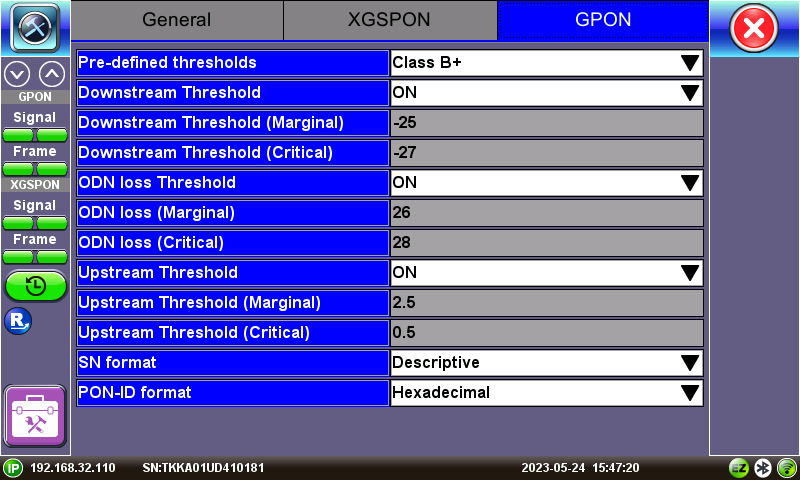
GPON OPM Setup menu
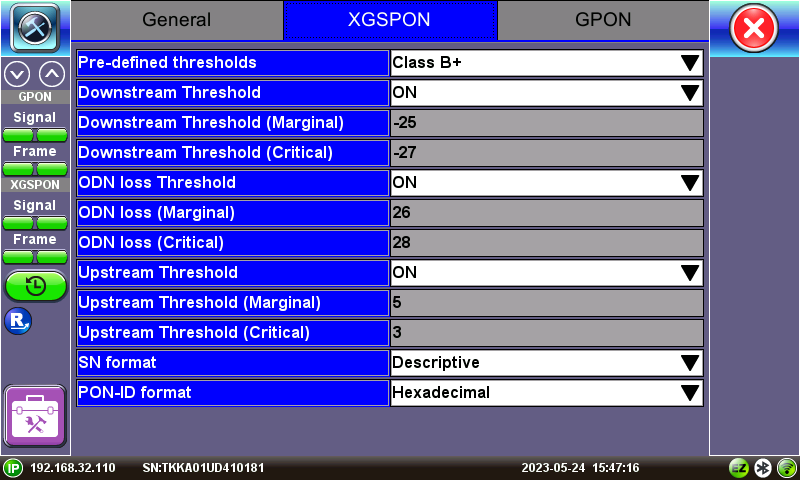
XGS-PON OPM Setup menu
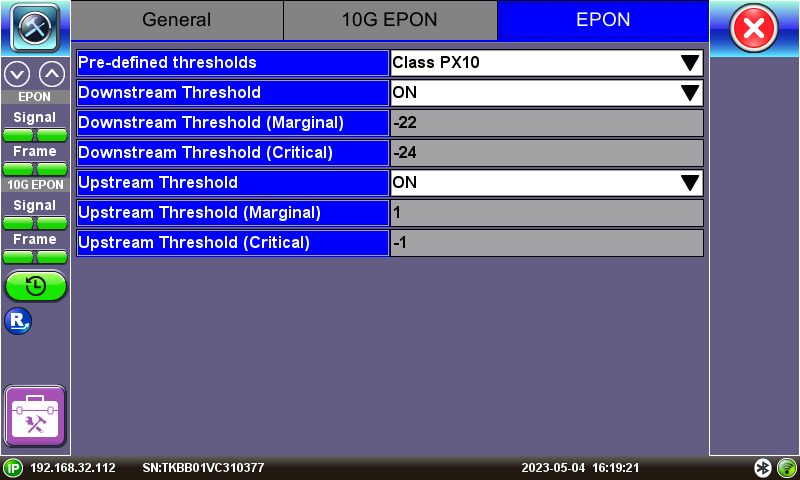
EPON OPM Setup menu
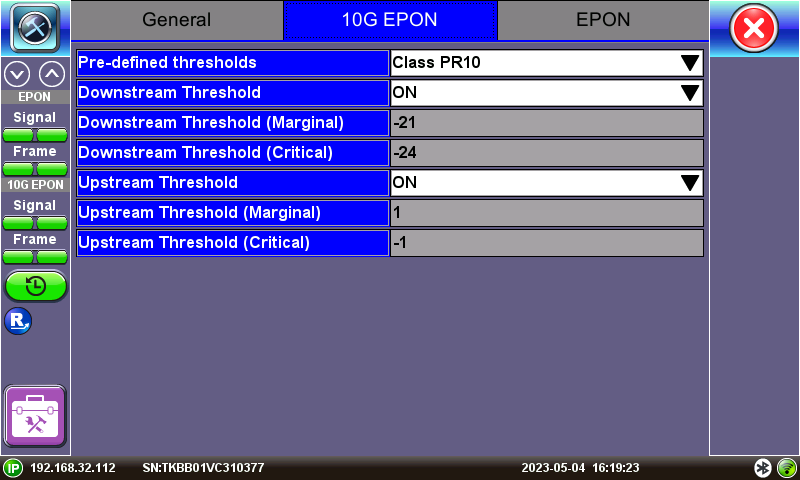
10G EPON OPM Setup menu